No products in the cart.




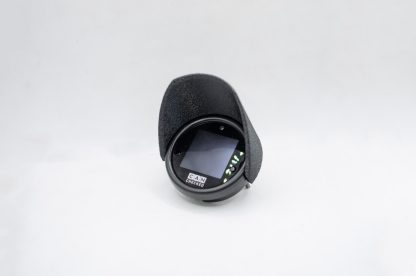
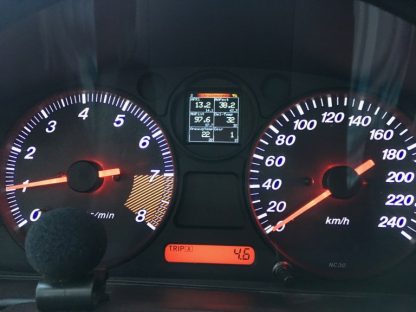
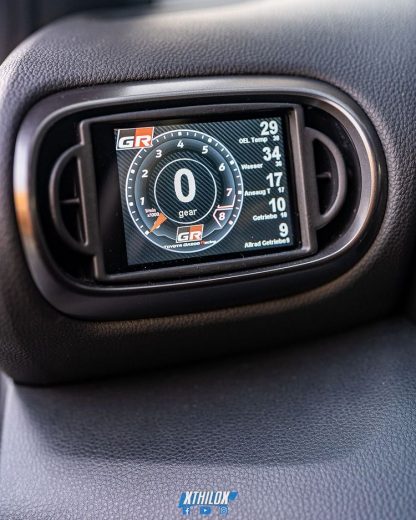
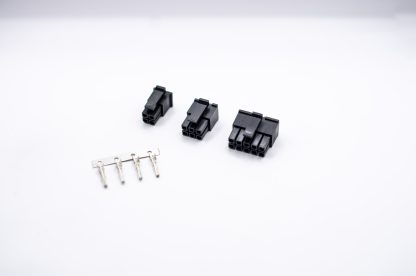
Description 52mm Round Gauge Bright and Easily Readable Colour OLED display Fully Programmable CANbus settings OBDII integration – CAN needed at the OBD2 Port SIX analog inputs for additional sensors User definable warning thresholds per sensor Integrated RGB LED – fully configurable for warnings Different views 6 Values 4 Values Double Value Double Bar Circular Display Single Needle Gauge Double value and Bar Performance Meter, Gear Position Indicator, 0-100kph timer, plus more! Online DSS – oDSS A completely new feature of our MFD15 Gen2 is access to the device via WiFi. So you no longer need a laptop/PC for the settings on your display. Configure your MFD15 from your smartphone! Here you can set up your display completely, log values (license required), upload your own start image and also update the display. Supported ECUs and Vehicles: Many customers always ask: “Which values can I request from my control unit”. The answer: ” ALL “. Our MFD15 is compatible with ISO 11898-2 and SAE J2284. The control unit manufacturers themselves determine which values are sent via the CAN bus interface. Documentation is important here – possibly even in the form of a DBC file that can be imported via CANchecked DSS software . You can also access our extensive list of already implemented controllers. These can be found in the CANchecked download area . A total of up to 64 sensors can be queried if the manufacturer supports this. Data available in the broadcast as well as OBD2 queries via Can Bus (11bit/29bit) are implemented. Special protocols such as UDS are also available. Included as standard are: – OBD2 – 11bit/29bit – Ecumaster Classic and Black – DTAfast – BMW E46 Can Bus – BMW E90 Can Bus – Haltech v2 – Hondata – KMS van Kronenburg – LinkECU – MaxxECU – Motec M1 – Emtron – Megasquirt 2 and 3 – Syvecs – Trijekt – VW/AUDI PQ34/PQ35 etc. – Audi S1 (CJX) – Audi RS3/TT-RS (DAZA, DNWA/B/C) – VW UP GTI (DKRA/B/C /D) If your ECU or Vehicle is not listed, please send us a message: Contact Vehicle Specific Integration We offer custom air vent bezel for many vehicles. This contains: – MFD15 Gen2 – vehicle-specific holder/cover in 52mm diameter – matching OBD connection cable Currently available integrations: – Audi A1 8X (incl. S1) – Audi A3 8P (incl. S3/RS3) – Audi A3 8V (incl. S3/RS3) – Audi TT 8N (without connection cable) – Audi TT 8J (incl . TT-RS) – VW Up (incl GTI) – Skoda Citygo – VW Amarok vFL – VW New Beetle Facelift – Fiat 500 / Abarth 595 – Nissan Skyline GT-R R33 (without connection cable) – Mazda MX5/Miata NC ND – Mini Cooper R56 – Ford Fiesta Mk6 Mk7 Please enquire about these products with us as we build our website to accommodate these products. Dimension and pin assignment Drehknopf = Rotary knob Any sensors can be connected via the six analog inputs – MFD15 supports both linear 0-5V and NTC sensors. Sensors that work great with the MFD15: Bosch Coolant Temp Sensor Syltech Pressure Temp Combo Sensor Syltech Pressure Sensor Flex Fuel Sensor – License Needed (purchased separately) Air Temp Sensor CAD Model Here are the CAD models for the MFD15 so you can integrate these displays into your next project perfectly. CAD_Dummy_MFD15.stl CAD_Dummy_MFD15.stp In the box Each Gen2 MFD15 includes: – Connector B (6-way) – Connector C (12-way) – 20cm pre-crimped connection cable for power supply, CAN bus, analog inputs, 5V and sensor ground – Pins to crimp yourself – Two 1K resistors (for pull-up for NTC sensors) CC22501 Rotary Encoder (optional) The rotary knob already known from the MFD15 Gen1 is now optional. It can be used when the front buttons of the display are difficult to reach or when you prefer to use the encoder. The connection is plug and play directly to connector B on the back of the display. With its 50cm long cable, it can be flexibly accommodated in the vehicle. CAN checked MFD15 Gen2 Rotary Encoder Logging from the MFD15 Gen2 With the “Online Logging” license, your display can log the data into the oDSS, where you can then download it as a file to your smartphone or PC. All sensors are logged in the log (ATTENTION: with OBD and UDS only the currently displayed ones!) . Select the sensors you may want to graph. Integrated shift light warnings The internal LED in the top center of the display can be used as a shift light and/or as a warning LED. Up to 8 different colors and speed limits are assigned as a shift light, as well as a speed at which the shift light flashes strongly and quickly. You can assign a min and max value for each sensor (in the oDSS via “Sensors”) and also activate the “LED” there. If the sensor is above the maximum value or below the minimum value, the LED flashes quickly in the color specified under “General Settings” => “LED warning”. The shift light is deactivated during the warning period. CAN switching and analogue forwarding The display can be expanded with a license for our ” Can Switching “. On the one hand, this contains button statuses, which are forwarded via Can Bus (ON/OFF) and, on the other hand, ” Analog Forwarding “, which the internal analog inputs send via Can Bus. The display offers emulations for: – CANchecked MCE18 and CFE18 – Haltech IOA, IOB or IOA B – Ecumaster (Emu v3) – LinkECU In the oDSS you can now configure the CAN switch under “General Settings” : – left button – right button – button of the optional rotary knob Can switch in the display The functions are then assigned to these buttons in the control unit. Eg: – MAP Switch – Launch Control – Antilag – Enable Fan – or others Alternatively, set the “Encoder button” to “Can Switch 1-6”. Here you get an overview of the buttons 1-6 and their current status. By turning the rotary knob, you reach the buttons and you can change the button status by pressing the rotary knob. In the oDSS you adjust the names of the buttons and thus you know exactly which function is active/inactive. Can switch 1-6 ” Analog forwarding ” forwards the sensors connected to the display (up to 6) to the control unit – these can be sensors, physical switches, position encoders or others. Ethanol sensor directly on the MFD15 Gen2 With the additional license for the ethanol sensor, you connect a flex fuel sensor directly to the display. Licenses can be purchased later and added to the display, send us an email to organise a license for your MFD15. You need a pullup resistor (10K) between 5V and signal. Now you can view and log both the ethanol content and the fuel temperature. If your flex fuel sensor is wired into your ECU, you don’t need any additional licensees to view your ethanol content. Downloads All downloads and information can be found in CANchecked download area
We make every effort to ship your product out as soon as possible once your order is placed & paid successfully. Actual delivery time may vary due to items, shipping methods, and other factors beyond our control. Each of our products has a specific availability and production time for personalized items. We will be sure to ship orders out within these time frames that are listed on each product page.
Delivery time = Processing time + Shipping time
Specific delivery time see below:
*This doesn’t include our 1-5 day processing time.
Where We Ship
For your convenience, we are happy to ship our products to every place in the world with Internationally.
Delivery time = Processing time + Shipping time
Specific delivery time see below:
| Shipping Method | Location | *Estimated Shipping Time |
|---|---|---|
| Free shipping | United States | 7-15 Business days |
| Free shipping | Canada, Europe | 7-20 Business days |
| Free shipping | Australia, New Zealand | 10-30 Business days |
| Free shipping | Other Countries | 15-40 Business days |
| Standard Shipping | United States | 6-10 Business days |
| Standard Shipping | Canada, Europe | 7-15 Business days |
| Standard Shipping | Australia, New Zealand | 7-15 Business days |
| Standard Shipping | Other Countries | 15-20 Business days |
| Expedited shipping | United States | 3-5 Business days |
| Expedited shipping | Canada, Europe | 3-6 Business days |
| Expedited shipping | Australia, New Zealand | 3-6 Business days |
| Expedited shipping | Other Countries | 5-7 Business days |
For your convenience, we are happy to ship our products to every place in the world with Internationally.
gewoondrukken.nl wants you to be a happy customer. We want you to be completely satisfied with the personalized jewelry or gift purchase that you receive from us. We do understand that you may not like your purchase for some reason.You may return or exchange your item within 60 days of purchase if you are not satisfied with it. The jewelry must be returned in its original condition for a refund or exchange. Engraved, personalized, photo, monogram, name and initial, chocolate and clearance items are not returnable or exchangeable.
You may also like…
Sale!
Sale!
$ 7.55
$ 91.16
Sale!
Related products
Sale!
Sale!
Sale!